Does Server Location Affect SEO? Complete Guide to Hosting, Speed & Rankings
Does server location affect SEO? Yes, indirectly. It improves page speed, latency, user experience, and Core Web Vitals, which can support higher search rankings.


Does Server Location Affect SEO?
Server location affects SEO indirectly by improving website speed, latency, and user experience. Google does not use server location as a direct ranking factor, but nearby servers can reduce Time to First Byte (TTFB), improve Core Web Vitals, and strengthen page performance. Faster websites often perform better in competitive search results.
Hosting closer to your audience can also improve geographic relevance for local SEO (opens in new tab) and international SEO. Regional hosting supports better user experience and works alongside hreflang tags, local backlinks, ccTLDs, and Google Search Console geo targeting settings. This can help businesses reach users more effectively in specific markets.
Modern CDN networks reduce the importance of physical server distance by delivering content through global edge locations. This allows businesses to maintain fast performance even when their main server is located elsewhere. Strong content delivery and backend optimization often matter more than server geography alone.
The best SEO results come from combining fast hosting, technical SEO, content quality, and audience targeting. Server location supports rankings through performance and accessibility, but businesses should prioritize overall website optimization for long term organic growth.
What Is Server Location in Hosting?
Definition of Server Location
Server location refers to the physical or cloud based geographic place where your website’s files, code, and data are stored and delivered from a hosting server or data center. When a user opens your website through a browser, their request travels through internet infrastructure, including ISPs, routers, and network pathways, to reach the server and return website content. This physical location directly affects latency, response time, and website loading speed.
For SEO and website performance, server location matters because geographic distance between the user and hosting server can impact page speed, Core Web Vitals, and user experience. While Google treats server location as an indirect factor rather than a major ranking signal, faster regional hosting can improve search visibility, especially in competitive SERPs where speed acts as a tie breaker.
Physical vs Cloud Server Locations
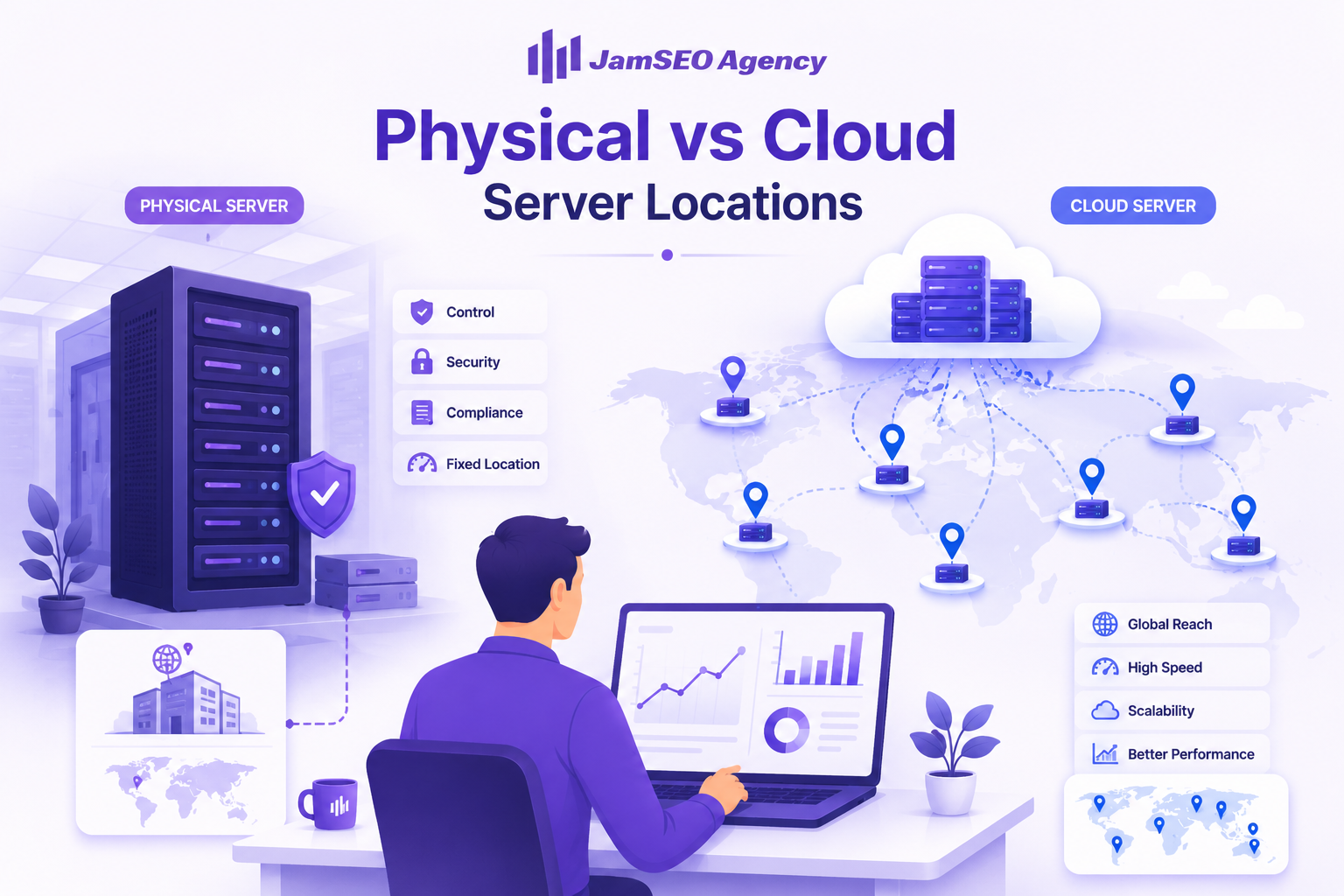
Physical servers store website files on dedicated hardware in a specific data center or privately owned hosting facility. This means your hosting location remains tied to one region, such as Europe or Japan, unless you use additional tools like CDN services. Traditional hosting can offer strong control, compliance benefits, and security, but distance may increase latency for global audiences.
Cloud hosting uses distributed global servers that can deliver content through multiple regions, improving flexibility, scalability, and speed optimization. Combined with content delivery networks and edge caching, cloud infrastructure reduces server distance and improves website responsiveness for international users. This makes cloud hosting more effective for businesses targeting worldwide traffic or resource heavy platforms.
Why Distance Between User and Server Matters
The farther data must travel between a website user and server, the longer it takes to complete requests and deliver content. Even though data moves quickly through cables and networks, longer geographic routes increase milliseconds, network congestion risks, and server response delays. This can slow website loading, page rendering, and overall site accessibility.
For businesses, reducing audience distance through regional hosting, CDN deployment, or optimized hosting strategy improves website speed, conversions, and search performance. Faster server proximity supports better mobile optimization, stronger page experience, and improved digital presence, which can provide a competitive SEO advantage in both local and international markets.
How Server Location Affects SEO
Page Speed and Core Web Vitals
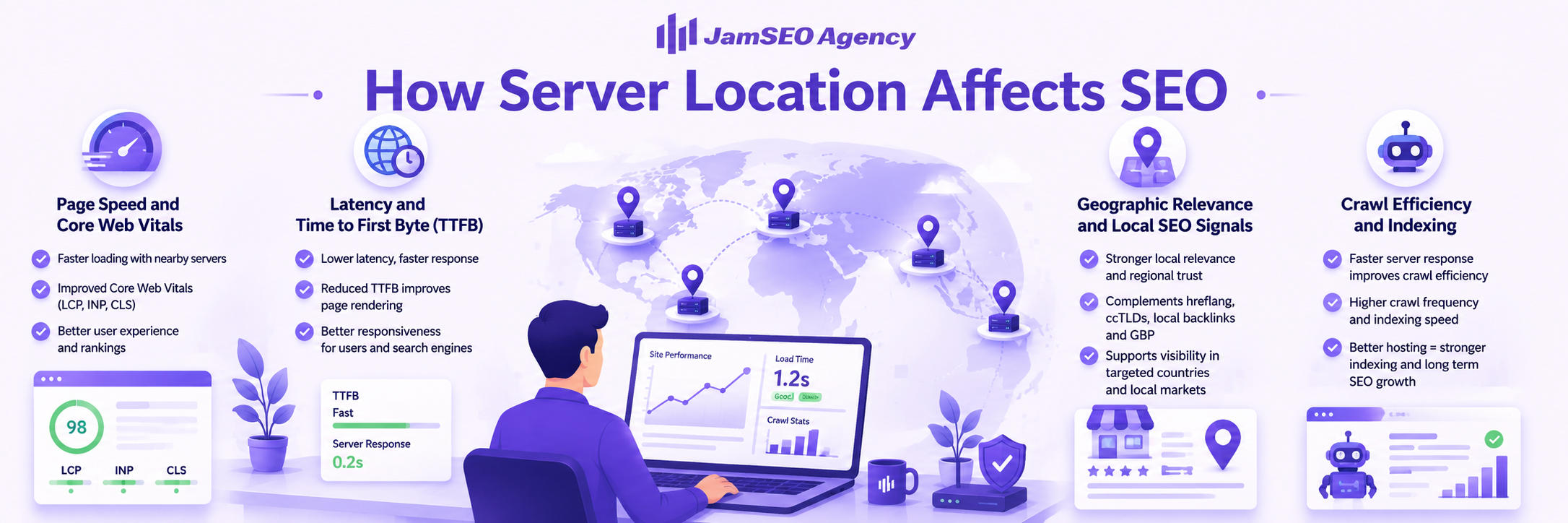
Server location affects website speed by changing how quickly data reaches users. Hosting closer to your audience reduces latency, improves Core Web Vitals like LCP and INP, and strengthens page experience. Faster websites often perform better in competitive search rankings.
Distant servers can slow load times, especially for dynamic websites or eCommerce platforms. Slower performance can reduce conversions, increase bounce rates, and weaken SEO results.
Latency and Time to First Byte (TTFB)
Latency and Time to First Byte (TTFB) increase when servers are far from users. Longer data travel times slow server responses, delay page rendering, and reduce website responsiveness.
Regional hosting, cloud infrastructure, and CDN solutions help reduce latency and improve page speed. Faster response times support both user satisfaction and technical SEO performance.
H3: Geographic Relevance and Local SEO Signals
Server location can support local SEO by improving geographic relevance. Hosting in the same region as your target audience may strengthen regional trust and complement signals like hreflang tags, ccTLDs, local backlinks, and Google Business Profile.
This can benefit businesses targeting specific countries or local markets, though stronger geo targeting signals usually carry more weight than server location alone.
Crawl Efficiency and Indexing
Fast server response helps Googlebot crawl websites more efficiently. Better hosting speed can improve crawl frequency, indexing speed, and content updates, especially for large websites or eCommerce stores.
Poor hosting performance may slow crawling and delay search visibility. Reliable hosting infrastructure supports stronger indexing and long term SEO growth.
How Server Location Impacts Website Performance

Network Latency & Response Time: Server location affects network latency by controlling how far data travels between users and the hosting server. Nearby servers reduce connection hops, improve response time, and create faster website loading. Distant servers increase latency, slow page responsiveness, and can weaken both user experience and technical SEO performance.
Content Delivery Speed: Hosting closer to your audience improves content delivery speed by reducing the time required to send website files, images, and code. Regional hosting often provides faster load times, while CDN networks enhance global performance by delivering content from the nearest server location. This balance helps businesses maintain strong speed across local and international markets.
Impact on UX & Engagement: Faster server performance improves user satisfaction by delivering smoother browsing, quicker interactions, and better page speed. Slow websites often increase bounce rates and reduce conversions, while optimized hosting infrastructure supports stronger engagement, better search visibility, and improved website authority.
Server Location vs CDN: Which Matters More?
What Is a CDN (Content Delivery Network)?
A CDN, or Content Delivery Network, stores cached copies of static website assets like images, CSS, JavaScript, and fonts across worldwide edge servers. When users visit your site, the CDN delivers this content from the nearest edge node, reducing latency and improving page delivery speed.
CDNs primarily optimize static content, while the origin hosting server still handles dynamic content such as database queries, checkout flows, API calls, and server side rendering. This makes CDN technology highly effective for improving website speed and Core Web Vitals without fully replacing hosting infrastructure.
CDN vs Server Location Explained
Server location determines where your origin server physically processes requests, which directly affects Time to First Byte (TTFB), dynamic content speed, and geographic SEO relevance. Hosting closer to your target audience often improves server responsiveness, especially for dynamic websites like WordPress, Magento, or eCommerce stores.
A CDN improves front end speed by accelerating cached assets, but it cannot fully solve slow backend performance if the origin server remains distant or underpowered. For SEO, server location and CDN serve different technical roles, making both important depending on audience location and website structure.
When a CDN Is Enough
A CDN alone often works well for static websites, brochure sites, blogs, or websites with light dynamic functionality. If most visitors access cached pages and your hosting server performs reliably, CDN deployment can significantly improve global page speed without changing server location.
For websites targeting multiple continents, CDN networks can often offset server distance enough to maintain competitive performance. However, uncached pages, cache misses, or dynamic requests may still expose limitations from poor origin server placement.
Optimal Setup: Server + CDN Combination
The strongest setup combines a high performance hosting server located near your primary audience with a well configured CDN for global content delivery. This approach improves both backend speed and static asset delivery, creating better TTFB, stronger Core Web Vitals, and smoother international performance.
Businesses should pair strategic hosting geography with server level caching, LiteSpeed or Nginx optimization, compression tools like Brotli, and CDN caching for maximum SEO performance. This balanced hosting strategy delivers the best mix of speed, scalability, search visibility, and user experience.

How Search Engines Use Server Location Signals
IP Address and Geolocation Signals
Search engines use server IP addresses as one of several geographic relevance signals to understand where a website may serve its audience. A server located in a specific country can help reinforce regional targeting, especially for local SEO or international SEO strategies (opens in new tab) focused on defined markets. For example, hosting in Europe may support visibility for European users when combined with localized content, hreflang tags, and regional language targeting.
However, Google relies more heavily on stronger geo signals like content relevance, ccTLDs, Google Business Profile (opens in new tab), and Search Console settings than server location alone. Server geolocation acts as a supporting factor rather than a dominant ranking signal, particularly when websites use global hosting or CDN infrastructure.
Google Search Console Geo-Targeting
Google Search Console allows website owners to set geographic targeting preferences, helping Google better understand the intended audience for a domain. This tool plays a larger role than server location for websites targeting specific countries, especially for generic top level domains like .com.
By configuring geo targeting correctly, businesses can strengthen local search visibility, improve international SEO performance, and align content with regional audiences. Combined with localized SEO strategies, Search Console settings help refine search discoverability far beyond hosting geography alone.
Role of DNS and Hosting Infrastructure
DNS services influence SEO by controlling how quickly browsers and search bots connect to your website. Fast DNS resolution reduces loading delays, improves site accessibility, and supports better page speed, which can strengthen both user experience and search performance.
Reliable hosting infrastructure, optimized DNS providers, and globally distributed points of presence improve uptime, crawling efficiency, and indexing reliability. Strong technical infrastructure ensures search engines can consistently access website content, making DNS performance an important but often overlooked part of technical SEO (opens in new tab).
Choosing the Best Server Location for SEO
Identify Your Target Audience Location
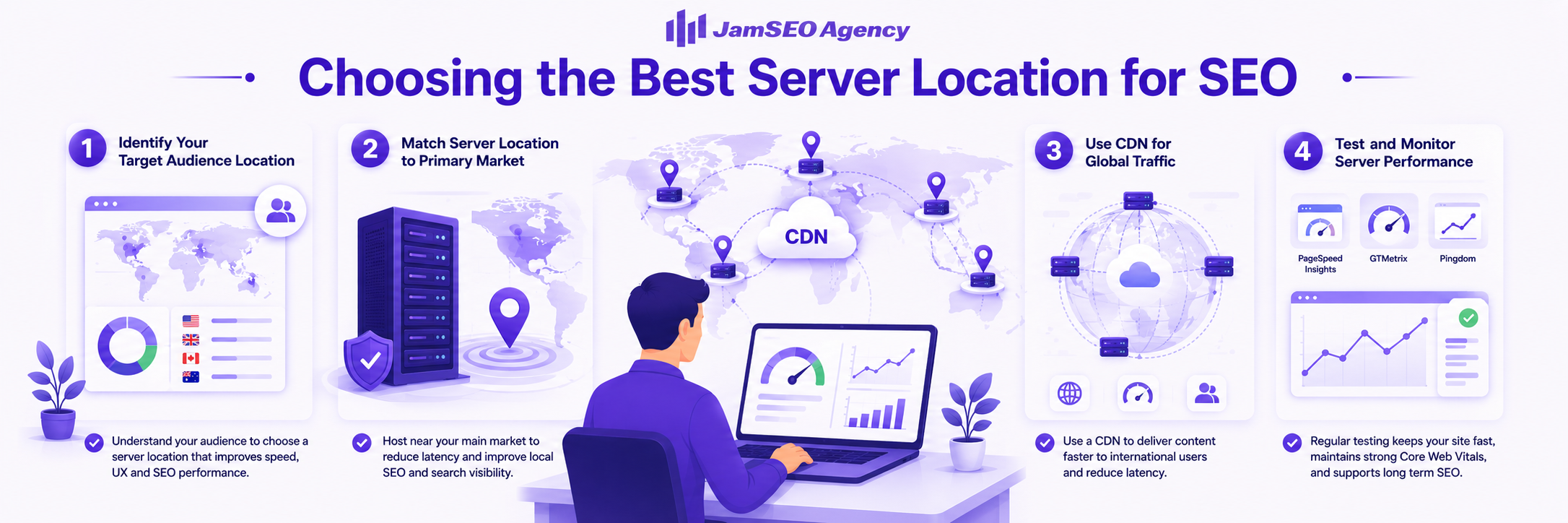
Use Google Analytics and Search Console to identify where your visitors and customers are located. Understanding your primary audience helps you choose a server location that improves page speed, user experience, and SEO performance for the regions that matter most.
Match Server Location to Primary Market
Place your hosting server near your main target market to reduce latency and improve response times. Regional hosting strengthens website speed, geographic relevance, and search visibility, especially for local SEO and country specific targeting.
Use CDN for Global Traffic
Deploy a CDN if your website serves international users across multiple regions. CDN networks improve global content delivery by reducing latency for distant visitors while maintaining strong performance without moving your primary hosting server.
Test and Monitor Server Performance
Monitor server speed regularly with tools like PageSpeed Insights, GTMetrix, and Pingdom. Ongoing performance testing helps you maintain strong Core Web Vitals, technical SEO, and consistent website responsiveness as your audience grows.
Server Location for Different SEO Scenarios
Local SEO (Country-Specific Websites)
For local SEO, hosting your website near your target country can improve page speed, reduce latency, and strengthen geographic relevance. Regional hosting supports better user experience for local visitors and can complement stronger ranking signals like ccTLDs, Google Business Profile, local backlinks, and geo targeting settings.
International SEO (Global Websites)
For international SEO, server location matters less when businesses use strong CDN infrastructure and global content delivery. Global websites should prioritize scalable hosting, multilingual SEO, hreflang implementation, and optimized performance across multiple countries rather than relying only on one physical server location.
eCommerce and Transactional Sites
For eCommerce websites, server proximity plays a larger role because speed directly impacts conversions, cart performance, and customer trust. Fast hosting infrastructure reduces checkout delays, improves user experience, and helps prevent revenue loss caused by slow load times or poor transaction responsiveness.
Common Myths About Server Location and SEO
Myth: Server Location Doesn’t Matter
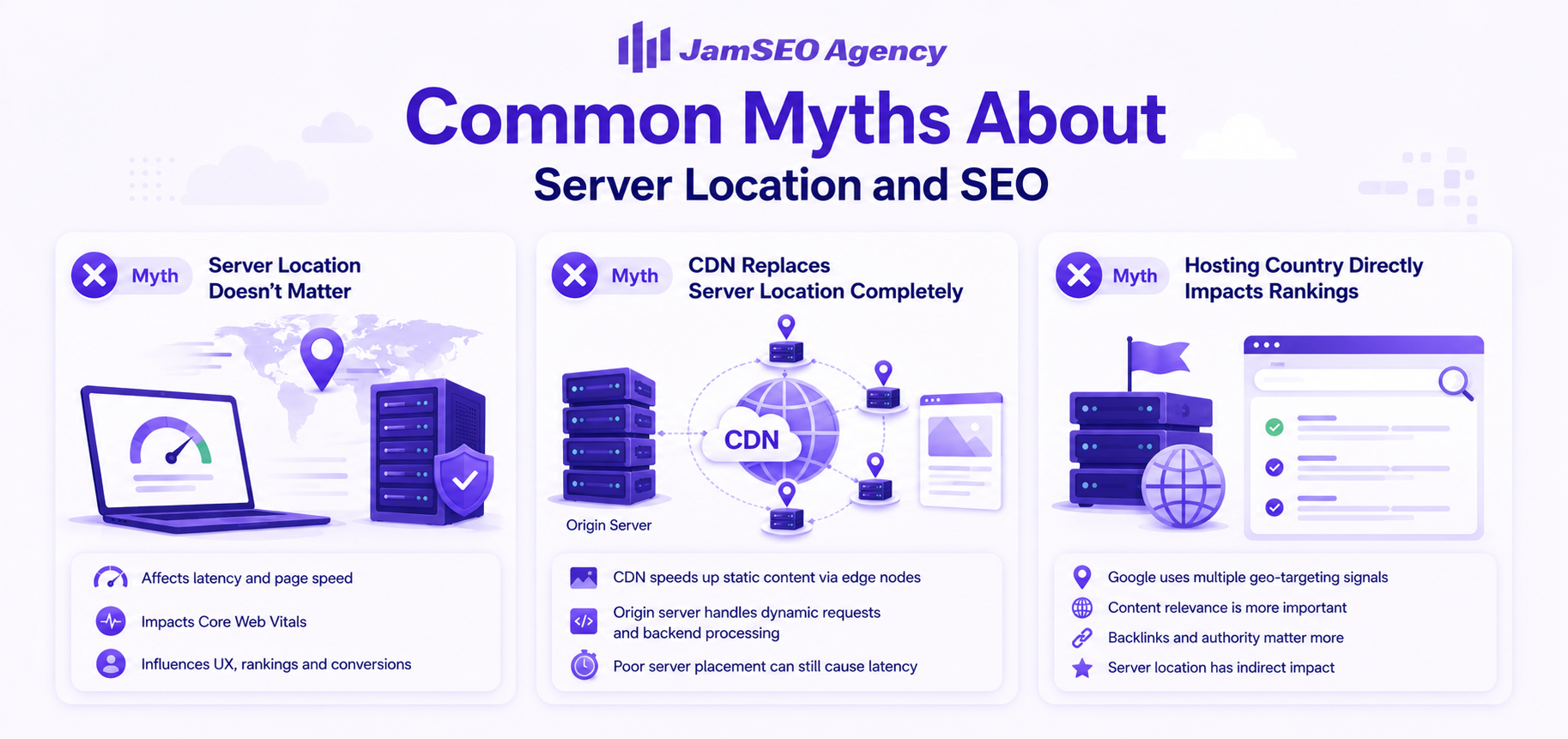
Server location does matter, but mostly as an indirect SEO factor rather than a direct ranking signal. Geographic proximity affects latency, page speed, Core Web Vitals, and user experience, all of which can influence search visibility and conversions, especially in competitive markets.
Myth: CDN Replaces Server Location Completely
A CDN improves static content delivery through edge nodes, but it does not fully replace server location. The origin server still handles dynamic requests, server processing, and backend performance, so poor server placement can still create latency issues even with strong CDN support.
Myth: Hosting Country Directly Impacts Rankings
Hosting in a specific country does not automatically improve rankings in that market. Google relies more on geo-targeting settings, content relevance, hreflang tags, local backlinks, and audience targeting than server location alone. Hosting geography supports SEO performance, but broader technical SEO and content quality carry far greater ranking weight.
How to Improve SEO Despite Server Location Limitations
- Deploy CDN services like Cloudflare or Bunny CDN to deliver static content from edge servers closer to users, reducing latency and improving global page speed.
- Minify code, compress files, optimize images, and enable caching to improve frontend and backend performance regardless of server distance.
- Use global load balancing tools to route visitors to the nearest server, improving response times and maintaining stable performance across multiple regions.
- Invest in faster, high quality hosting with scalable cloud infrastructure, better uptime, and stronger backend resources to improve SEO and user experience.
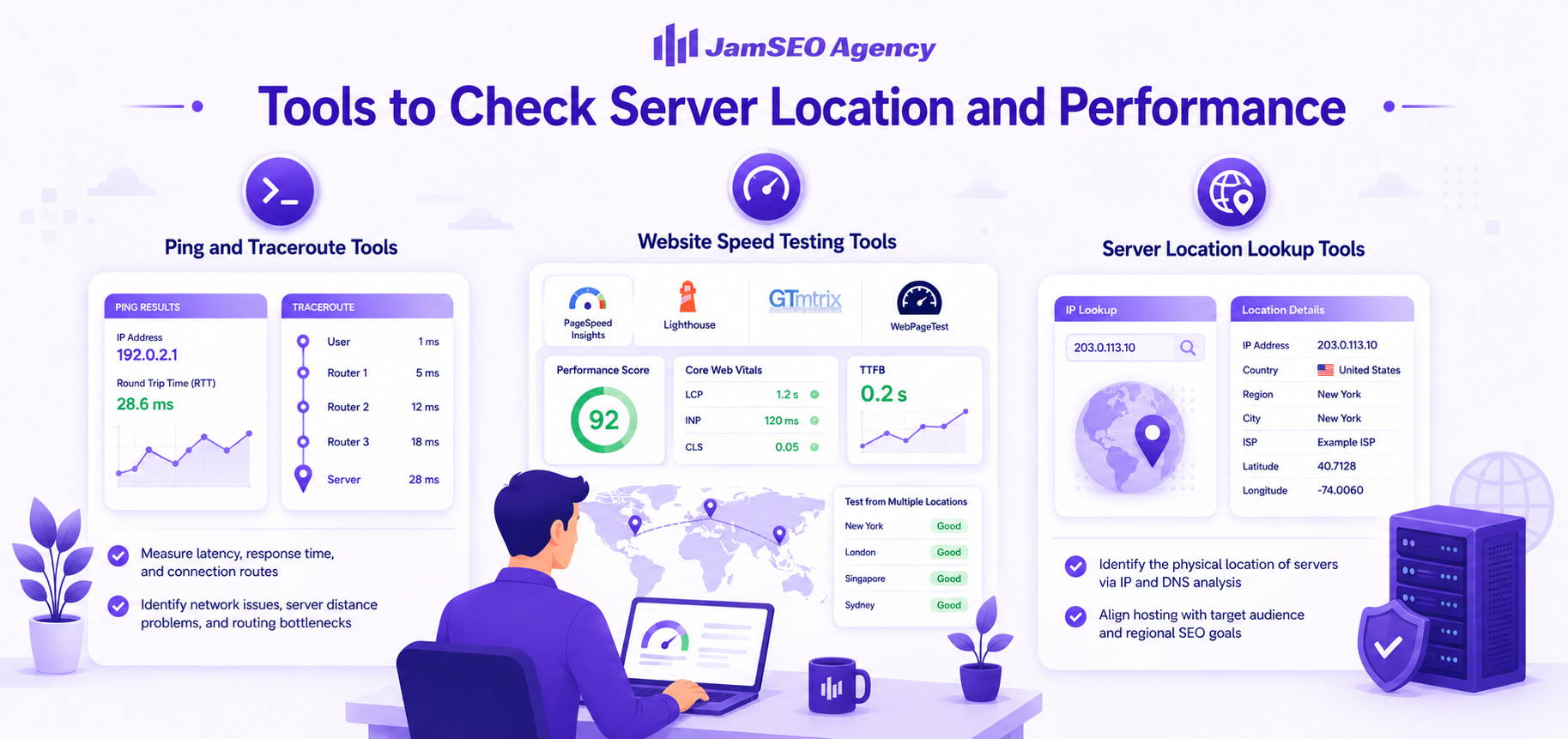
Tools to Check Server Location and Performance
Ping and Traceroute Tools
Ping and traceroute tools help measure network latency, server response time, and connection routes between users and hosting servers. Ping checks round trip time (RTT) to identify latency levels, while traceroute maps packet paths through routers and networks to reveal delays or routing bottlenecks.
These tools help diagnose connectivity issues, server distance problems, and infrastructure inefficiencies. Regular network testing can reveal whether server geography or poor routing affects website speed and user experience.
Website Speed Testing Tools
Google PageSpeed Insights (opens in new tab), Lighthouse, GTMetrix, and WebPageTest measure Core Web Vitals, Time to First Byte (TTFB), and page load performance across different regions. These tools identify slow server responses, content delivery bottlenecks, and technical SEO weaknesses that may affect rankings.
Testing from multiple global locations provides a clearer view of how server placement impacts international performance. Businesses should monitor speed metrics regularly to improve page responsiveness and maintain strong SEO performance.
Server Location Lookup Tools
Server location lookup tools identify the physical location of hosting servers through IP address analysis and DNS records. These tools help businesses verify whether their hosting environment aligns with their target audience and regional SEO goals.
By confirming server geography, businesses can make smarter hosting decisions, improve audience targeting, and optimize infrastructure planning for better website speed, accessibility, and search visibility.
Common Mistakes to Avoid
Ignoring Target Audience Location
Choosing server locations without considering user geography can create unnecessary latency and weaker user experience. Hosting far from your regional audience may reduce page speed, local SEO relevance, and search visibility, especially for country specific or local markets.
Relying Only on Cheap Hosting
Low cost hosting often sacrifices performance, uptime, and backend resources for affordability. Cheap shared hosting can create slow load times, server bottlenecks, and technical SEO issues that negatively impact rankings, conversions, and long term website growth.
Not Using CDN for Global Traffic
Websites targeting international users should use CDN infrastructure to distribute static content through global edge servers. Without a CDN, distant visitors often experience slower load times, higher latency, and weaker page speed performance across global markets.
Ignoring Core Web Vitals
Overlooking Core Web Vitals like LCP, INP, and CLS can weaken page experience and reduce SEO performance. Google prioritizes speed, responsiveness, and visual stability, so businesses must monitor and optimize these metrics to maintain strong rankings and user satisfaction.
Frequently Asked Questions
Conclusion: Does Server Location Really Matter for SEO?
Server location affects SEO indirectly by influencing page speed, Time to First Byte (TTFB), Core Web Vitals, and user experience. Google does not treat server location as a primary ranking factor, but faster hosting can improve technical SEO and provide an advantage in competitive search results.
For most websites, hosting near your primary audience improves speed, accessibility, and conversions. CDN networks, cloud infrastructure, and optimized hosting strategies can reduce geographic limitations while supporting global reach and strong backend performance.
The best SEO results come from combining quality hosting with strong content, backlinks, and technical optimization. Server location matters most when it supports faster website performance, better compliance, and improved user satisfaction.
Muhammad Yousaf
Jam SEO Agency
Leads JamSEO Agency vision, growth, and client success through data driven SEO and digital strategy.